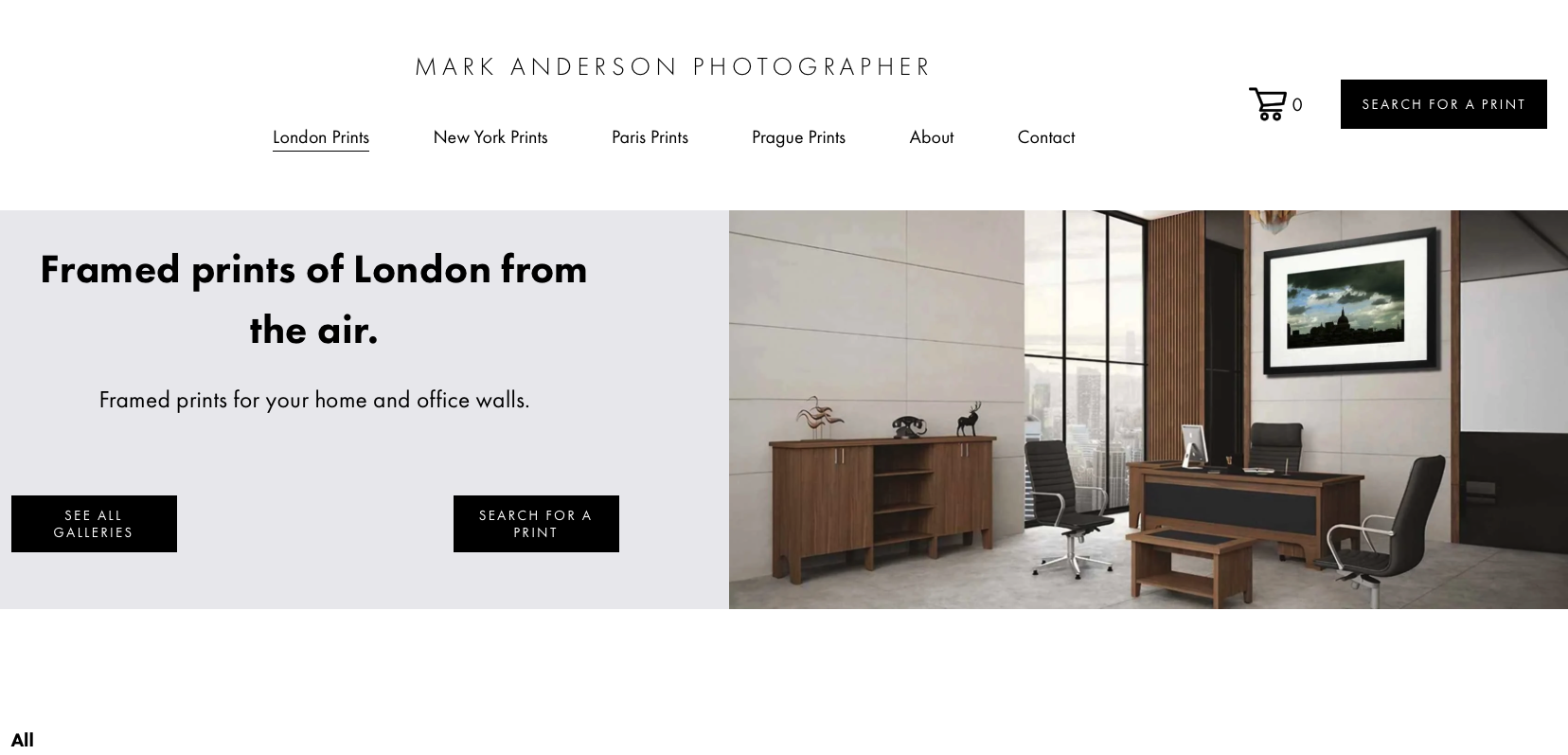
The Photographer’s Template Overview.

The Photographer’s template is designed to put your photography front and centre, giving your work the space and attention it deserves. With a clean, image-led approach, it helps you create a professional online presence without letting complicated design get in the way. Whether you’re showcasing weddings, portraits, fashion, commercial work or a broader portfolio, the template provides a polished foundation that can be adapted to your own style and brand.

One of its biggest advantages is the time it can save. Instead of starting a website from a blank page or spending hours trying to work out layouts, typography and presentation, you have a considered structure ready to customise. That means you can spend less time building your website and more time photographing, editing and working with clients. It’s an especially practical option for photographers who want a professional-looking website without taking on the cost or learning curve of a fully bespoke design.

The template also offers strong value because a good photography website needs to do more than simply display images. It needs to communicate who you are, establish credibility and make it easy for potential clients to understand your work and take the next step. A thoughtfully structured template gives you a professional starting point for presenting your portfolio, introducing your services and creating a consistent experience across your website.

For photographers, that balance of professional presentation and affordability can make a significant difference. A custom-designed website can require a substantial investment of both time and money, while a template provides a more accessible route to achieving a distinctive online presence. You can personalise the content and visual identity so the finished site feels like your business, without paying for every element of the design process from scratch.

The Photographer’s template is therefore a practical investment for anyone who wants their website to look professional without making the website itself the project. It gives you a ready-made design foundation, reduces the time involved in getting online and leaves you with more freedom to focus on your photography and your clients. If you’re looking for a polished website solution that offers professional presentation without the price and complexity of a fully bespoke build, it provides a compelling starting point.

How we would suggest The Photographer’s Template could be customised to a photographer’s or artist’s website.

1. A Photographer's website

For a professional photographer, the template can be customised to put the photographer’s strongest images at the heart of the website. The homepage can be adapted to introduce the photographer, establish their particular style and immediately direct visitors towards key portfolios such as weddings, portraits, fashion, editorial, events or commercial work. Individual galleries can then be created as dedicated projects or stories, while an About page, testimonials, services and contact or enquiry sections provide the information needed to turn an interested visitor into a prospective client. The template already lends itself particularly well to photographers because its original purpose is to showcase photography while supporting commercial enquiries and print sales.

2. An artist's website

The same visual structure can be transformed into a more personal artist’s portfolio by replacing the photography with paintings, drawings, sculpture, digital artwork or mixed-media pieces. Instead of organising the site around photography categories, the navigation could be built around collections, series, exhibitions or individual bodies of work. Typography and colours can be changed to reflect the artist’s personality, while large images and generous spacing can create an online environment that feels closer to an exhibition than a conventional business website. A biography, artist statement, CV, exhibition history and contact information could also be incorporated without losing the clean, image-led character of the original design.

3. An Art Gallery website

For an art gallery, the template can be customised to create a more curated and editorial experience. The homepage could feature a rotating selection of current exhibitions, featured artists and newly acquired works, while separate pages could present individual exhibitions as online galleries. Each artwork could have its own image, title, artist, medium, dimensions and availability information. The navigation could also be reorganised around exhibitions, artists, artworks, news and contact information. With the addition of ecommerce or enquiry functionality where appropriate, the design could move beyond simply displaying artwork and become a practical digital showroom for collectors and visitors.

4. A Commercial art website

A commercial art website could use the template to present creative work specifically to agencies, brands, publishers, interior designers, architects or other professional clients. Instead of simply displaying a large portfolio, the website could organise work according to commercial applications, such as advertising, editorial, packaging, interiors, campaigns or commissioned projects. Case-study pages could show the finished artwork alongside information about the brief, creative process and final application. Prominent enquiry buttons and a clear services section could make the website more commercially focused while retaining the visual impact of the original design.

5. Changing the visual identity

One of the most significant customisations is the ability to replace the template’s existing visual identity with one that belongs entirely to the new business. Global fonts, colours, button styles, spacing and other design settings can be changed to establish a distinctive brand before individual pages are refined. This means an artist could use an understated monochrome palette, an established gallery could adopt a sophisticated editorial style, or a commercial creative business could introduce stronger branding and typography. Making these global changes first helps create consistency across the entire website.

6. Rebuilding the page layouts

The template should not be treated as a fixed arrangement of pages and sections. Its sections can be substantially rearranged, with content blocks moved, removed or replaced to suit the organisation’s needs. For example, a photographer might want a large full-width image followed by selected projects, whereas an artist might prefer a statement followed by a series of artworks. A gallery could prioritise current exhibitions, while a commercial art business might put services and selected client projects closer to the top of the homepage. The underlying structure therefore becomes a framework that can be rebuilt around the actual content.

7. Creating different portfolio experiences

Portfolio presentation can also be customised according to the type of creative work being displayed. A photographer may divide work into genres, an artist may organise it into collections or series, and a gallery may organise it by exhibition or artist. Individual project pages can provide additional context and allow visitors to explore a body of work in greater depth. This is particularly useful for commercial creatives because a project can be presented as a case study rather than simply as another image in a grid. The result is a website that communicates not only what the creative professional produces, but also how their work can be experienced or commissioned.

8. Adding ecommerce and commercial functionality

The template can also be adapted when the website needs to do more than display creative work. A photographer selling prints could use product pages and purchasing functionality, while an artist could display individual works with enquiries or purchasing options. A gallery could potentially use product functionality for available artworks, editions or publications. A commercial art business might instead prioritise enquiry forms, downloadable information, booking systems or other integrations. The platform supports additional functionality such as forms, galleries, products, portfolios, scheduling and integrations, allowing the site to develop beyond its initial visual structure.

9. Making the website work for its audience

Customisation should also reflect what visitors need to know. A photographer’s visitor may want to see a portfolio and make an enquiry; an artist’s visitor may want to understand the artist’s practice and upcoming exhibitions; a gallery visitor may be looking for current exhibitions, artists or available works; and a commercial client may want to establish quickly whether the creative business is suitable for a particular commission. Navigation, calls to action and page order can therefore be changed to create a clear journey for each audience. The template’s original guidance similarly emphasises replacing the placeholder content and arranging the pages so that the visitor has a clear route towards contacting the business or purchasing its products.

10. Turning the template into a completely individual website

Ultimately, the Photographer’s template can be treated as a professionally designed foundation rather than a finished website that has to remain recognisable. The images, words, colours, fonts, logo, navigation, sections and functionality can all be adapted so that the finished website reflects the individual creative business. This makes it possible to start with a strong visual framework while developing a completely different purpose and personality: a photographer can turn it into a client-focused portfolio, an artist into an online studio, a gallery into a digital exhibition space, or a commercial art business into a sophisticated sales and enquiry platform. The result is a website built around the organisation’s own work rather than simply a template with different pictures inserted into it.

How to set up SEO on this template

Once you have customised the Photographer’s template into your finished website, the next step is to make sure every page is properly optimised for search engines. The template provides a strong visual and technical starting point, but your own photography, services, locations and specialist areas should be reflected throughout the website. Give each important page a clear purpose, with a descriptive page title, a strong main heading and relevant wording that explains exactly what type of photography you offer and where you work. This helps search engines understand what your website is about and helps potential clients find the right page.

Your portfolio is particularly important because a photography website can easily become image-heavy. Each gallery or project should be supported by useful written information rather than relying entirely on photographs. Give individual galleries descriptive names, include relevant information about the type of photography and, where appropriate, mention the location, client or project. Images should also be properly named and given meaningful alt text that describes what is shown. Google recommends descriptive filenames and useful alt text because they help search engines understand images while also improving accessibility.

You should also optimise the technical and on-page elements of the finished website, including SEO page titles, meta descriptions, URLs, headings, internal links and image sizes. Think carefully about the phrases your potential customers would actually search for—for example, a particular type of photography combined with a town, city or region—and make sure these phrases appear naturally in the relevant content rather than being repeatedly inserted. The finished website should also have a clear structure, making it easy for visitors and search engines to move between your portfolio, services, about page and contact page.

If you buy one of our templates before 30th October 2026, we will add the SEO you need to your finished website at no additional cost. Our SEO package is worth £385.00 if purchased separately and covers the important optimisation work needed once your own content has been added, including page structure, content, keywords, metadata, internal linking and other relevant SEO settings. This means you can concentrate on creating a beautiful photography website while we make sure the finished site is properly prepared for Google and other search engines.

Ask us a question about this template.

email us: info@mostexcellentweb.com

or call Mon - Sat 9am-6pm +44 (0)208 333 0151

or fill in the form below and we’ll get back to you.