

Which is our best website design for a photographer?
This is a new template. Its a template design for a photographer. It’s bold, beautiful and shows the photographer’s work in a shop style gallery. It’s easy to navigate, great on a mobile and has our usual great shop attached.
You can easily make this template into your own website, and we’ll help you if you need it.
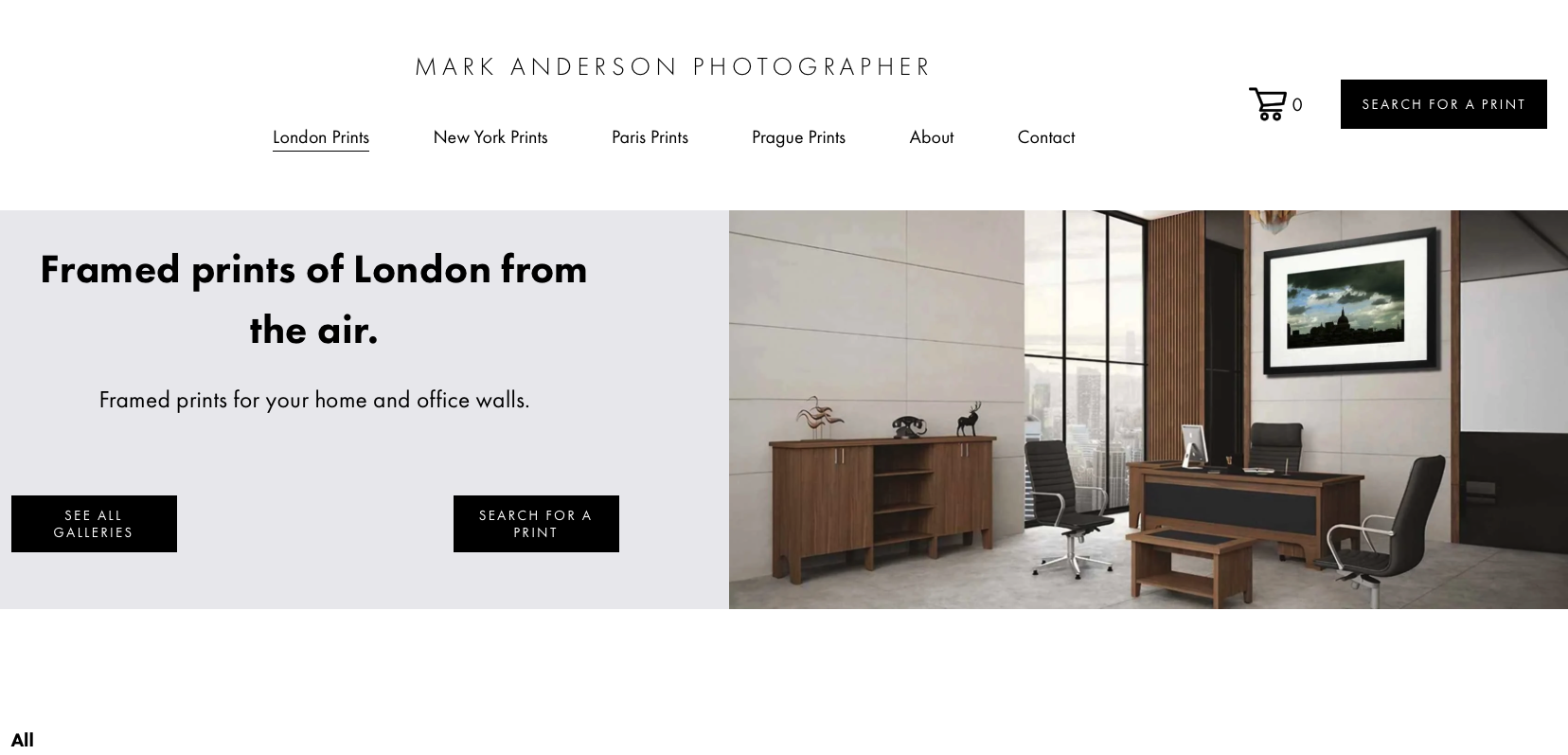
This photographer’s website all about showing the work in order to attract commercial clients.
View this design
You’ll want to make this template into your own website. Whether you sell prints, shoot weddings or you’re a headshot photographer you need to a website that shows you do one thing really well: make someone want to hire you, then make it easy for them to do so.
To make this template into your own website we would include the following items and functionality. We’ll help you if you need it.
1. Strong homepage
Your homepage should immediately communicate:
Who you are
What type of photography you do
Where you’re based / where you work
A striking selection of your best images
A clear “Enquire / Book Me” button
For example:
London wedding photographer specialising in natural, documentary-style photography.
2. Portfolio
This is probably the most important part.
Don't show everything you've ever photographed. Only include your strongest work.
You could organise it into:
Weddings
Portraits
Fashion
Events
Commercial
Editorial
Couples
Families
Tip: 20–40 excellent images are generally more effective than 150 mediocre ones.
3. About page
People aren't just hiring your camera—they're hiring you.
Include:
A good photograph of yourself
Short introduction
Your photography style
Your approach/personality
Experience or background
Where you work
Anything that makes you distinctive
Keep it personal rather than turning it into a CV.
4. Services / Pricing
Make it obvious what someone can hire you for.
For example:
Wedding photography
Couple shoots
Portrait sessions
Events
Commercial photography
You can either show prices or say “Packages from £X” and invite enquiries.
If your pricing varies significantly, explain what's included rather than simply saying “contact me for prices.”
5. Individual galleries / case studies
This can make a website feel much more professional.
Instead of just having a portfolio grid, create pages such as:
“Sarah & James — London Wedding”
Then show the story of the day with photographs, perhaps accompanied by a little context.
This is particularly useful for wedding, event, commercial and editorial photographers.
6. Testimonials
Social proof is extremely valuable.
Include:
Client name
Short testimonial
Ideally a photograph from their session/event
Even 3–6 strong testimonials can make a big difference.
7. Contact / enquiry page
Make contacting you ridiculously easy.
Include a simple form asking for things like:
Name
Email
Phone (optional)
Date
Location
Type of shoot
Approximate budget (optional)
What they're looking for
And make sure your email/social links are visible too.
8. Clear calls to action
Don't make people hunt for the next step.
Use buttons such as:
Enquire Now
Check Availability
Book a Shoot
View Portfolio
Get in Touch
Put one in the navigation and at natural points throughout the site.
9. Instagram / social media
If social media is an important part of your business, link to it—but don't make people leave your website to see your work.
Your website should remain the main portfolio, with Instagram acting as an extension of your brand.
10. Practical essentials
Don't forget the boring-but-important stuff:
Mobile-friendly design
Fast-loading images
Good image compression
SEO/page titles
Location keywords where appropriate
HTTPS/security
Privacy policy
Cookie notice if required
Terms & conditions
Copyright information
Accessible image alt text
Analytics
A really good basic structure
Home
→ Portfolio
→ Services
→ About
→ Testimonials
→ Contact
For a more premium photographer, I'd consider:
Home
Work
Weddings
Portraits
Editorial
Commercial
Experience / Services
Stories / Journal
About
Testimonials
Contact
The biggest mistake to avoid
A photographer's website shouldn't feel like a gallery with a contact page attached.
It should answer the visitor's questions:
“Do I like their work?” → “Do they photograph what I need?” → “Can I trust them?” → “How much does it cost?” → “How do I book them?”
This new template is £195.00 and for a limited time we’ll help you with everything you need to make this website your own. We’ll help you populate it and connect it to your domain and we’ get you an email. Using one of our Squarespace website templates gets you up an running quickly. We’ll look look after the SEO you’ll need to get you ahead of your competitors and we’ll tell Google that you’re online so they can index your website.
Take a look at all of our designs here . You may see another design you like that we can customise to become your new photography website.